Wireless Battery Tray
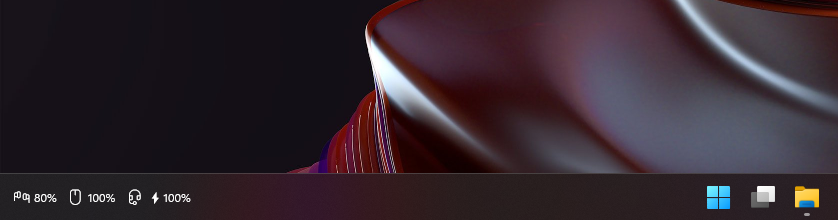
Battery levels of your wireless keyboards, mice, headsets and controllers, right on the Windows taskbar of the monitor you choose.
What it does
- Always in viewOne icon and percentage per device, inside the taskbar next to the clock.
- Any monitorPick the display, left or right side, and an offset.
- Charging and low batteryA bolt while charging, red below your chosen level.
- Out of the wayHides with the taskbar in full-screen apps and follows light/dark mode.
- Your layoutShow, hide, reorder and relabel devices with a live preview.
- Read-onlyOnly ever queries devices. Optional, click-to-install updates.
Supported devices
| Device / family | Connection | Battery | Charging |
|---|---|---|---|
| Bluetooth headsets, earbuds and others that report battery to Windows | Bluetooth classic | ✓ | – |
| BLE keyboards and mice, including split keyboards | Bluetooth LE | ✓ | – |
| Logitech on Unifying, Bolt and Lightspeed receivers | 2.4 GHz receiver | ✓ | ✓ |
| SteelSeries Arctis Nova 7 family | 2.4 GHz dongle | ✓ | ✓ |
| Sony DualShock 4 | Bluetooth, USB | ✓ | ✓ |
| Keychron keyboards on a Keychron Link | 2.4 GHz receiver | – | – |